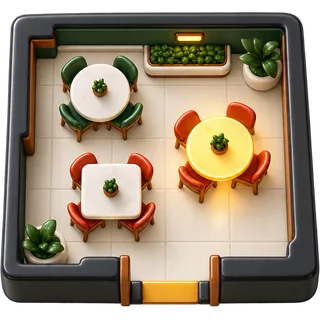
5:10 PM · the host stand
A restaurant floor plan POS that shows the whole room at a glance
A restaurant floor plan POS puts your dining room on the screen: every table, who is serving it, and where it is in the meal. Hosts seat faster, servers stop walking the room to check, and the owner sees the night without leaving the pass. Restaurant POS Studio builds your tables per location and runs in a browser on the tablets you already own.
- Open
- Seated
- Ordered
- Fired
- Check
How does the floor plan work in Restaurant POS Studio?
You add your tables per location, name or number them, and group them by section. During service each table shows its status and server. Tap a table to open its check, send items to the kitchen and later take payment. Every register shows the same view, so the host and servers work from one picture of the room.
Setup happens in the back office. Pick a location, add tables one by one, and give each a name the staff already use, such as T12, Patio 3 or Bar 1. You can assign tables to sections so each server knows their station. If you run two locations, each one has its own tables, its own registers and its own reports.
During service the floor plan is the home screen for servers. An empty table is open. When a party sits, the server taps the table, picks the guest count and starts the check. Items go to the kitchen screen or printer. When the check is paid, the table clears and is ready for the next party. Nothing needs to be written on paper.
- Tables per location, named the way your staff already talk
- Sections so each server sees their own station
- Guest count captured when the table opens
- Service staff assigned to each order, with a service-staff timer
- Same live view on every register and tablet
Who needs table management, and when does it matter most?
Any sit-down restaurant with more than a handful of tables and more than one server needs table management. It matters most on a Friday rush, when the host is quoting waits, three servers are sharing a section, and a manager needs to know which tables have been waiting too long for mains or for their check.
A 40-seat bistro with two servers can survive on memory for a while. A 120-seat dining room with a patio cannot. Once tables turn two or three times a night, the cost of a missed table shows up fast: a party that waited 15 minutes for water, a check that sat unpaid, a host who seated a dirty table.
The floor plan helps most at the points where service breaks. The host sees which tables are close to paying. The manager sees which server has five open tables and which has two. When a server goes on break or leaves early, staff replacement moves their open tables to someone else without closing the checks.
- Host: see tables close to paying and quote waits honestly
- Server: one tap from the table to the check
- Manager: spot a server who is overloaded before guests complain
- Owner: table and service-staff reports after close
What does a floor plan POS cost to run?
Tables and table-based ordering are included from the Counter plan, with no add-on fee for the floor plan. Full Service adds unlimited registers and kitchen screens, coursing with fire and hold, and bookings. Group adds multi-location reporting. There is no hardware to lease: it runs in a browser on iPads, Android tablets or PCs you already own.
The real running cost of a floor plan is not the software line. It is the tablets, the Wi-Fi and the training time. Because Restaurant POS Studio runs in a browser, you can use tablets you already have and replace one from any electronics store if it breaks. You do not sign a hardware lease.
Training is short because the floor plan looks like your room. Most servers learn it in one pre-shift. Plan prices are on the pricing page and are charged per location per month, month to month, with a 14-day free trial that needs no card. We do not add PCI or statement fees.
- Tables on every plan, no floor-plan add-on
- Bring your own tablets, PCs or phones
- Month to month, no contract
- 14-day free trial, no card required
Why use a digital floor plan instead of a paper chart or a basic POS?
A paper chart only knows what the host wrote down. A basic counter POS has no tables at all, so checks get named after guests and lost. A digital floor plan ties every check to a table and a server, updates the moment an order is sent or paid, and leaves a record you can report on after close.
Paper charts and grease pencils work until the host steps away. Then nobody knows which table on the patio just paid. Counter-style systems built for coffee shops treat every order as a tab, which is fine for takeout and painful for a six-top that wants separate checks and a second round.
A table-service POS keeps the table as the anchor for everything: the order, the courses, the server, the split and the tip. That is why the floor plan sits at the center of Restaurant POS Studio rather than as an extra screen. It is also why table and service-staff reports exist: they come straight from how the night actually ran.
- Every check tied to a table and a server
- Status changes when food is fired or the check is paid
- Table and server reports built from real service data
- Works with splits, courses and tips on the same check
From host stand to paid check
The same table, five states, every screen in sync.
- Add your locationCreate the business with your currency, time zone and logo, then add the location where the dining room is.
- Add tablesAdd each table with the name or number your staff already use, and group them into sections or stations.
- Add staff and PINsCreate service staff with their own PINs and roles so each order and table is tied to the right person.
- Run a test serviceOpen a few tables, send test items to the kitchen screen, split one check and close it. Fix any table names that confuse people.
- Go live on a quiet nightStart on a slower weeknight, keep a manager on the floor for questions, and review the table report after close.
Paper floor chart vs counter POS vs table-service floor plan POS
| Need during service | Paper chart | Counter POS (tabs only) | Floor plan POS |
|---|---|---|---|
| See which tables are open | Only if the host updated it | No tables | Live on every register |
| Know which server has a table | Written in pencil | Name on the tab | Assigned on the order |
| Move a table to another server | Rewrite the chart | Reopen and rename tab | Staff replacement in a few taps |
| Split a six-top's check | Calculator at the table | Manual, item by item | By seat, item, amount or evenly |
| Report on table turns | Not possible | Not possible | Table report after close |
| Works for multiple locations | One chart per room | Usually separate systems | Tables per location, central reports on Group |
What can go wrong — and the fix
Table names on the screen do not match what staff say, so servers open the wrong check.
Use the exact names your team already uses, including patio and bar seats, and test them in a pre-shift walk-through.
A server leaves early and their open tables are stuck under their name.
Use staff replacement to move open tables to another server before they clock out, so tips and reports stay correct.
The host seats a table that still has an unpaid check from the last party.
Close every check on the POS when guests pay, not later. A cleared table on screen should always mean a paid check.
Wi-Fi drops in the back corner of the patio and the tablet stops updating.
Walk the full floor with a tablet before go-live and add an access point where the signal is weak.
Floor plan questions
Onboarding desk · usually replies within a business day
Can I set up different tables for each of my locations?
Yes. Tables belong to a location, so each restaurant has its own room. Your second location can have different table names, sections and registers. On the Group plan you also get reports across all locations in one place.
Do I need to draw an exact map of my dining room?
No. You add tables with names and sections that match how your staff work. The goal is that a server finds T12 in one tap. Most owners set up a 30-table room in well under an hour.
Can a server see only their own tables?
Each order is assigned to a service staff member, so servers can find their own tables quickly and reports show who served what. Managers still see the whole room. Roles control what each person is allowed to change.
What happens to a table when a server goes home mid-shift?
You move their open orders to another server with staff replacement. The checks stay open with all items and courses. The new server takes over and the tip and sales reports follow the change.
Can I take reservations and see them on the floor plan?
Yes, on Full Service. The bookings calendar ties a reservation to a table, a staff member and a start and end time. You can choose to notify the customer. The host then knows which tables to hold before the party arrives.
Does the floor plan work on an iPad and an Android tablet at the same time?
Yes. Restaurant POS Studio runs in a browser, so iPads, Android tablets and PCs can all be registers in the same location. Every device shows the same table status. There is nothing to install beyond a browser or the mobile app.
How do I handle bar seats and walk-in counter orders?
Add bar seats as tables, such as Bar 1 to Bar 8, so drinks and food stay on the right check. Takeout and walk-in orders can be rung without a table. Both show up in the same sales and tax reports.
Can I see how long a table has been waiting?
The service-staff timer shows how long an order has been running, and the kitchen screen shows ticket times. Together they tell a manager which tables are waiting too long. That is the moment to send a server or check the pass.
Will my servers need long training to use table management?
Usually one pre-shift is enough. The floor plan looks like the room, so servers already know where T12 is. We suggest a test service with a few fake orders before your first real night.
Can I combine two tables for a large party?
Seat the party at one table and add their guest count, then ring all items on that check. If they want to pay separately, split the check by seat or item at the end. That keeps the kitchen ticket as one order for one party.
Seat the next Friday faster.
Start the free trial and draw your room tonight. It takes about five minutes.